
// you mistyped the domain
Access the Online HTML Editor at
html-online.com
Introduction
In web development, having the right tools at your fingertips is crucial. For all your HTML editing✏ needs, you may be familiar with our trusted platform, html-online.com. We appreciate your support and want to ensure that you're getting the best experience possibel. That's why we recently acquired this htmlonline.com domain, and we want to encourage you to make the switch and access the editor on the correct domain.
Keeping You On Track
The acquisition of htmlonline.com simplifies your journey to our HTML editor in case you enter the address incorrectly. With this shorter and more intuitive name, you can easily access our platform, saving you valuable time. It's all about making your web development experience smoother and more efficient, even if you mistype the web address.
Secured Branding
After repeated attempts by others to copy our HTML editor and imitate our brand, we secured this domain to protect our name. Switch to html-online.com and enjoy our unified brand experience.
Consistent User Experience
Consistency is key in the online world, and we want to ensure that your experience with our HTML editor is seamless across all aspects, even if you miss the "-" character from the URL. This experience reflects our dedication to simplicity, reliability, and innovation.
Stay Updated and Connected
Read our blog to ensure that you're always in the loop with the latest updates, features, and improvements. Our commitment to delivering cutting-edge HTML editing tools remains unwavering, and htmlonline.com is the gateway to staying connected with our advancements.
Future-Proof Your Experience
Choosing htmlonline.com is an investment in the future of your web development endeavors. Our team is continuously working to enhance the HTML editing experience, and by aligning yourself with our primary domain, you position yourself at the forefront of innovation and future developments. If you need even more features then make sure to purchase a license for our pro editor hosted on HTML6.com
// what you get
Everything in one editor.
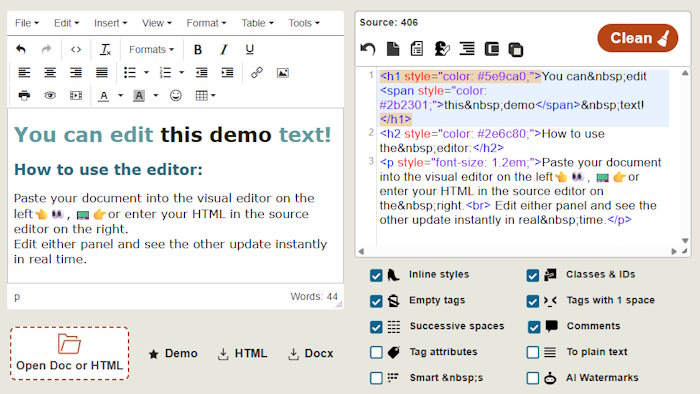
A WYSIWYG editor, a syntax-highlighted source view and an HTML cleaner. Free, in your browser, no install or sign-up.
Live dual panel
Visual editor on the left, source code on the right. Both stay in sync in real time. Work in whichever panel you prefer.
Visual formatting
Style headings, paragraphs, links, lists, images, tables, colours and alignment without touching raw markup.
Source editor
Edit highlighted HTML with tag matching, line wrapping and a resizable code area for full control.
One-click cleanup
Strip inline styles, classes, IDs, empty tags, comments and spacing noise. All at once, or one rule on demand.
Open & save files
Open .html, .htm and .docx; download clean HTML, a ZIP packaged with images, or a Word DOCX document.
Local drafts
Smaller drafts auto-save in your browser, so your backup stays on your device and never leaves it.
// how to use the Editor?
Four steps.
Paste or open
Type it, paste from Word or a website, or drag in an HTML / DOCX file.
Edit
Use the rich-text toolbar, then jump to the source panel for direct HTML control.
Clean
Switch on the rules you need and hit Clean to strip junk and fix markup errors.
Download
Save as HTML or DOCX zips automatically when the page references local images.
// cleaning options
Ten cleanup rules.
Turn rules on for a full cleanup, or run a single one on demand. The first six are enabled by default.
Plus Find & replace: up to 10 custom rules in the source editor, with regex support and case matching. Saved to your device for next time.
// good to know
FAQ
Can I embed it on my own site?
Not as a free plugin. There's no installable version. If you only want to display the editor inside your page, an iframe is the simplest allowed way.
Does it work offline?
Yes, once the page has fully loaded. You need a connection to open the editor and load its assets, but after that you can keep working even if you go offline.
Is my content private?
Your documents aren't stored and there's no database behind the editor. Complete privacy can't be guaranteed, though. Third parties such as your host, Cloudflare, analytics, browser and extensions may still see page activity.
Do I need to install anything?
No. The editor runs directly in any modern browser. No downloads, plugins or sign-up, so you can start editing instantly on any device.
// conclusion
Grow with us.
As we evolve and grow, we want you to grow with us. The acquisition of htmlonline.com, beside html-online is a step towards a more streamlined, memorable, and consistent user experience. Make the switch today, and continue to enjoy the best-in-class HTML editing services that html-online.com has to offer. Thank you for your continued support, and we look forward to empowering your web development journey on our enhanced platform.